Gold Star Echo Chamber
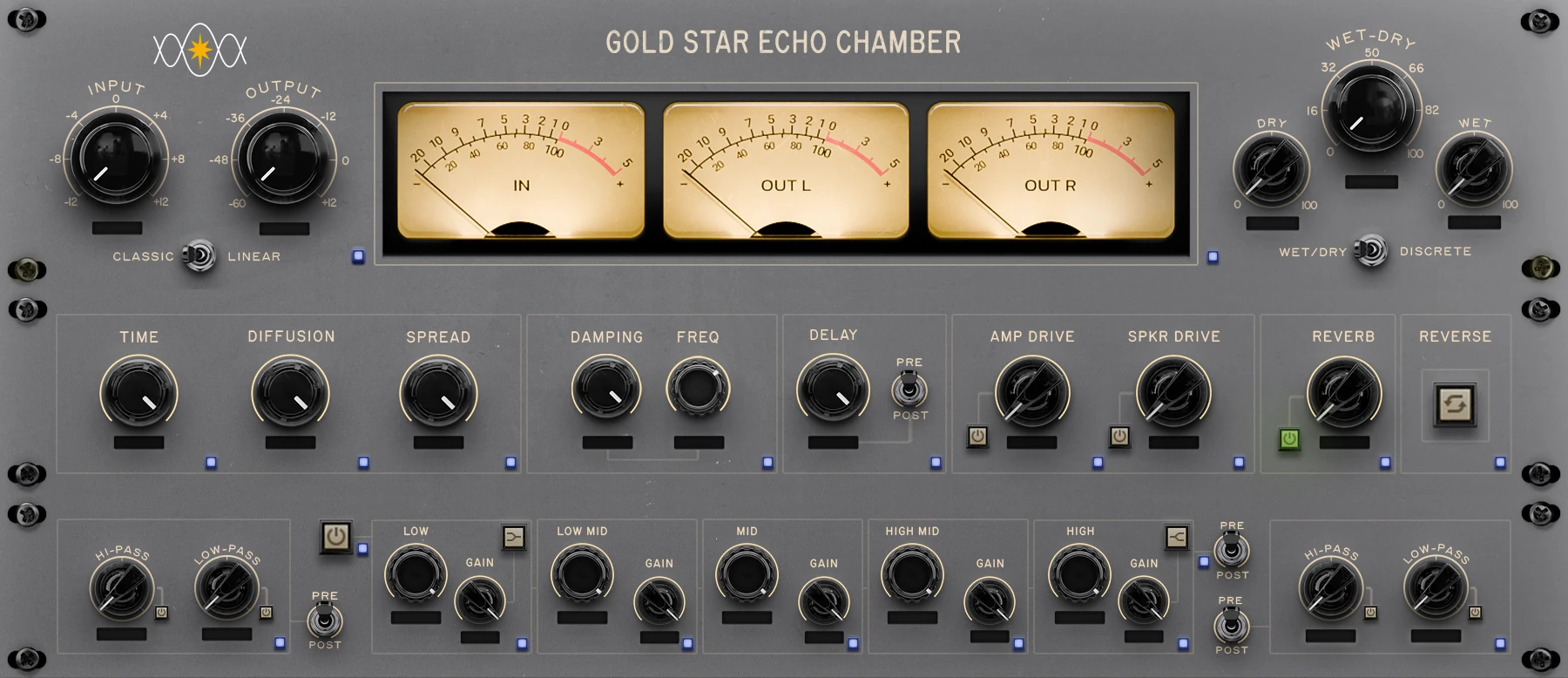
A convolution reverb built from impulse responses of the Gold Star chambers, captured with rare recordings and exclusive archives. Nothing in the tail is synthesized.
VST3 and AAX for macOS and Windows, plus AU on macOS.
The plug-in
What is an echo chamber?
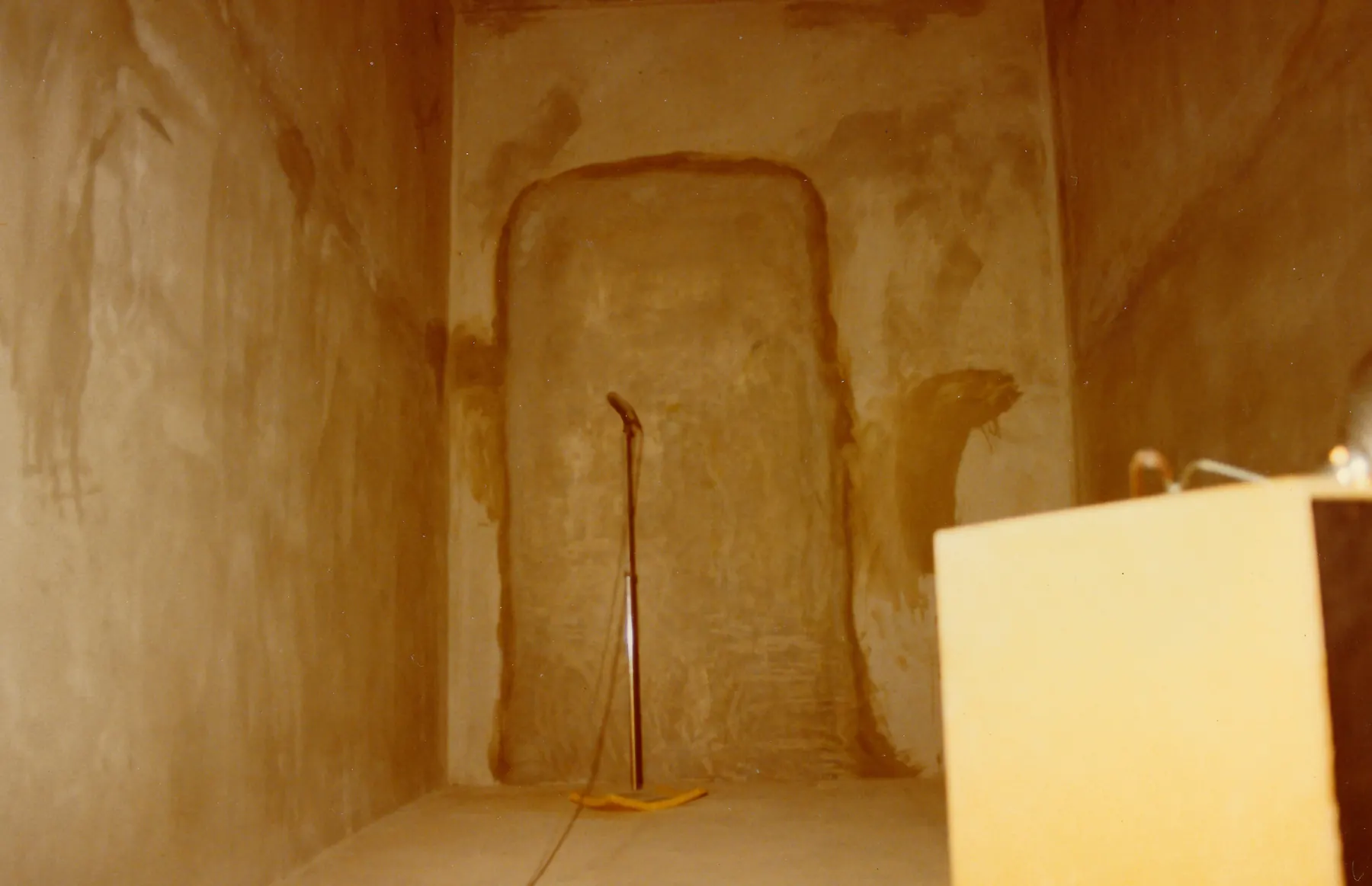
A purpose-built reverberant room used in studios before electromechanical and digital reverb were widely available. A loudspeaker at one end plays the program signal, microphones at the other end capture the room, and the two are mixed back together at the console. Gold Star's two chambers were built behind Studio A in 1956.
Can I change the room itself? No, and that is the point.
The geometry, surfaces, and microphone positions were fixed when the chambers were captured. The controls act on the signal sent into the convolution stage, on the returning wet signal, and on the balance between wet and dry. As with the original chamber, you can shape that signal with EQ, pre-delay, Amp Drive and Speaker Drive.
Specifications and System Requirements
A convolution chamber reverb for macOS and Windows: VST3 and AAX on both, plus Audio Unit on macOS.
- Operating system
- macOS 14 Sonoma or later; Windows 10 and 11, 64-bit
- Processor
- Mac: Apple silicon or Intel (universal binary); Windows: 64-bit
- Plug-in formats
- VST3, Audio Unit (AUv2) and AAX on macOS; VST3 and AAX on Windows; 64-bit
- Hosts
- Pro Tools (AAX), or any 64-bit host that loads VST3 or Audio Unit plug-ins
- Disk space
- About 160 MB per format installed
- Installer
- macOS: Developer ID signed and Apple-notarized .pkg for each format (administrator password required); the AAX plug-in is PACE-signed
- Activation
- License key or free trial; internet connection required to activate
- Not included
- CLAP and standalone versions
- Processing
- True convolution through measured chamber impulse responses, in 32-bit floating point
- Impulse responses
- Gold Star chamber and room captures, including stereo, long-decay and mono; recorded at 48 kHz / 24-bit
- Sample rate
- Follows the session rate; impulse responses are resampled with a windowed-sinc filter
- Channels
- VST3 and AU: mono or stereo in, mono or stereo out (stereo by default). AAX: mono, mono to stereo, or stereo
- Latency
- 2047 samples (42.6 ms at 48 kHz), reported to the host for automatic delay compensation
- Reverb tail
- Reported to the host (10.5 s) so decays are not cut off at region ends
- Bypass
- True bypass, latency-aligned, with an equal-power crossfade
- Input gain
- −12 to +12 dB
- Time (decay)
- 0.5× to 1.5× each chamber’s natural decay, up to 10 s
- Pre-delay
- 0–500 ms, pre or post
- Diffusion
- 0–200%
- Damping
- 0 to −24 dB bell cut, frequency 20 Hz–20 kHz
- Spread (stereo width)
- 0–100%
- Filters, in and out
- Two pairs, each a high-pass (0–1000 Hz) and a low-pass (1–20 kHz); each filter switchable, each pair pre or post
- Five-band EQ
- Low 20–250 Hz, low mid 250–500 Hz, mid 500–2000 Hz, high mid 2–4 kHz, high 4–20 kHz; ±12 dB per band; bell or shelf on low and high; pre or post
- Speaker drive / amp drive
- 0–100% each, independently switchable
- Reverb level
- 0–100%, switchable
- Reverse
- On / off
- Mix
- Single wet/dry balance, or discrete dry and wet levels (−80 to 0 dB)
- Mix mode
- Classic or Linear
- Mono input mode
- On / off
- Output
- −60 to +12 dB
- Presets
- 168 factory presets in three groups (Factory, Classics and Artists), unlimited user presets and 6 hold-to-store memory buttons
- MIDI Learn
- Map any control to a hardware controller
- Automation
- 51 parameters, all automatable except Mix Mode and Mono Input Mode; every setting is recalled with your session
- Undo and redo
- Up to 64 steps, for control changes and preset saves
- Recall safe
- 20 lights that keep the controls you choose when you change presets
- Interface
- A rack of three collapsible modules (meters, I/O and mix; chamber; EQ), three VU or digital peak meters, dark and light themes, and window sizes from 100 to 200%
- Help built in
- Hover hints and a bundled user manual, plus an online guide
VST is a registered trademark of Steinberg Media Technologies GmbH. Apple and macOS are trademarks of Apple Inc., registered in the U.S. and other countries and regions. Windows is a trademark of Microsoft Corporation. Pro Tools and AAX are trademarks or registered trademarks of Avid Technology, Inc. in the U.S. and other countries. Other product names are trademarks of their respective owners.
Pricing & licensing
How licensing works
Download free, try the whole plug-in in your session, then buy a license key.
Download
Get the installer free. It carries the plug-in (VST3 and AAX, plus AU on macOS) and the Preset Library; the trial build is the full plug-in.
Try it for 14 days
Start the trial from the lock control in the toolbar. Every feature, no dropouts, commercial work allowed. The clock starts when you activate the trial, not when you download.
Buy and activate
Buy in the store, get your license key by email, and enter it in the plug-in. One perpetual license covers 2 computers you own. An activated machine works offline and only needs a once-a-year internet sync to verify the license.
Frequently asked questions
Company-wide questions about licenses and refunds are answered in the Glass Harbor FAQ
What kind of reverb is this?
A convolution reverb. It is built from impulse responses of the real Gold Star echo chambers, captured with rare recordings and exclusive archives, so the reverb you hear is the measured acoustic behavior of those rooms rather than a synthesized algorithm. Nothing in the wet path is modeled.
What is an echo chamber?
A purpose-built reverberant room used in studios before electromechanical and digital reverb were widely available. A loudspeaker at one end plays the program signal, microphones at the other end capture the room, and the two are mixed back together at the console. Gold Star's two chambers were built behind Studio A in 1956.
Can I change the room itself?
No, and that is the point. The geometry, surfaces, and microphone positions were fixed when the chambers were captured. The controls act on the signal sent into the convolution stage, on the returning wet signal, and on the balance between wet and dry. Time and Diffusion do reshape the impulse response before convolution, but neither invents early reflections.
What controls does it have?
Input gain (−12 to +12 dB); Time, from 0.5× to 1.5× each chamber's natural decay, up to 10 seconds; pre-delay from 0 to 500 ms; Diffusion (0–200%); Damping, a bell cut of 0 to −24 dB at its frequency (20 Hz to 20 kHz); Spread, the stereo width (0–100%); two filter pairs, in and out, each a high-pass (0–1000 Hz) and a low-pass (1–20 kHz); a five-band EQ (low 20–250 Hz, low mid 250–500 Hz, mid 500–2000 Hz, high mid 2–4 kHz, high 4–20 kHz, ±12 dB per band, with bell or shelf on the low and high bands); Speaker Drive and Amp Drive (0–100% each, switched independently); the Reverb level (0–100%); Reverse; a single wet/dry balance or separate dry and wet levels (−80 to 0 dB); Classic or Linear mix mode; Mono Input Mode; and output from −60 to +12 dB. Each filter pair, the EQ and the pre-delay can run before or after the reverb.
Which formats and systems does it support?
VST3 and AAX for macOS and Windows, plus AU on macOS. The macOS build needs macOS 14 Sonoma or later, is a universal binary that runs natively on both Intel and Apple silicon, and is Developer ID signed and notarized by Apple, with its AAX plug-in PACE-signed. The Windows build runs on Windows 10 and 11, 64-bit; it is the same product and the same license, so one key covers whichever machines you activate. The plug-in runs at any host sample rate; the impulse responses are resampled internally.
Does it add latency?
Its latency is a fixed 2047 samples at every sample rate (42.6 ms at 48 kHz), and the plug-in reports it to your host for automatic delay compensation, so the reverb stays in time with the rest of your session. It reports its reverb tail as well (10.5 seconds), so decays are not cut off at the end of a region.
Is there a free trial?
Yes. The trial is the complete plug-in for fourteen days: no disabled features, no noise or dropouts, no limits on saving. The fourteen days start when you activate the trial from the lock control in the toolbar, not when you download, and starting it needs an internet connection. When the trial ends the plug-in stops passing audio, but sessions containing it still open with every setting and automation lane intact, and they pick up where they were once you activate a license.
How many computers can I use it on?
Each license allows two simultaneous activations on computers you own or control, such as a studio desktop and a laptop. Licensing is machine-locked: deactivate from inside the plug-in to free an activation for another machine. A trial activation is separate and does not use up either of the two.
Does it need an internet connection?
Only to activate, deactivate, or start the trial, and once a year to verify the license. In between, an activated machine works offline, and a failed sync attempt never disables the license. The plug-in sends licensing data only, never your audio, sessions, or usage.
How do I buy it, and do I need an account?
Buy from the store on this site. Checkout is handled by Paddle, our merchant of record, and there are no accounts or passwords: your license key is emailed to the address you use at checkout, normally within minutes, and the installers are on the download page. Enter the key in the plug-in's activation panel to unlock it.
What is the refund policy?
A full refund within fourteen days of purchase, provided the purchased license has not been activated on any computer. Using the free trial never affects that. If a genuine defect stops the plug-in working as described and support cannot fix it, we refund regardless of activation or the fourteen-day window, and duplicate purchases are refunded regardless of activation. The full terms are in the Refund Policy.
Can I use it on a send instead of an insert?
Yes, and it is the recommended setup. Insert it on a stereo return (aux) track, leave the Wet-Dry knob at 100% (the default) so the return carries reverb only, and send to it from each track. That reproduces the original send-and-return chamber configuration. Mono Input Mode feeds the chamber the same mono signal whatever a send's pan. On an insert, set the Reverb lever to Discrete for separate dry and wet levels; flipping the lever keeps the audible balance.
What does it cost?
The Gold Star Echo Chamber is available now. The launch price is $75, 50% off the regular $150, plus tax, for a perpetual license with two activations. Minor updates within a major version are free; major version upgrades may be paid.




Hear it on your own mix.
Try the Gold Star Echo Chamber free for 14 days, the whole plug-in in your own DAW. $75 for a perpetual license at launch, 50% off the regular $150.